I suggest reading this short introduction https://httpd.apache.org/docs/2.4/rewrite/intro.html (15 mins) and referencing these 2 pages while reading:
https://httpd.apache.org/docs/2.4/mod/mod_rewrite.html https://httpd.apache.org/docs/2.4/rewrite/flags.html
This is the basic rule to hide index.php from the URL. Put this in your root .htaccess file.
mod_rewrite must be enabled, with PHP version higher than 5.2.6.
RewriteEngine On
RewriteCond %{REQUEST_FILENAME} !-f
RewriteCond %{REQUEST_FILENAME} !-d
RewriteRule (.*) /index.php/$1 [L]
Think of %{REQUEST_FILENAME} as the path after the host.
E.g. for https://www.example.com/index.html, %{REQUEST_FILENAME} is /index.html.
So the last 3 lines mean: if it's not a regular file !-f and not a directory !-d, then apply the RewriteRule.
As for RewriteRule formats:
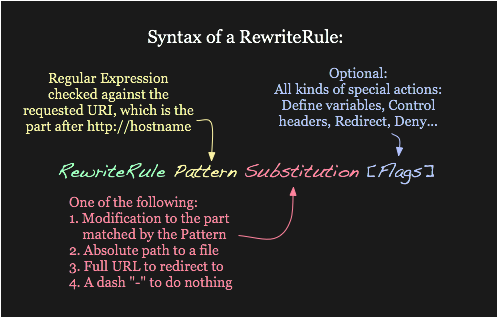
So RewriteRule (.*) /index.php/$1 [L] means: if the 2 RewriteConds are satisfied, (.*) matches everything after the hostname. . matches any single character, .* matches any characters, and (.*) captures it as a variable that can be referenced with $1 — then it is replaced with /index.php/$1. The final effect is to prepend index.php to the whole URL path.
E.g. for https://www.example.com/hello, it would produce https://www.example.com/index.php/hello internally.
Another key point: this does solve the question. Internally it (I guess) always needs https://www.example.com/index.php/hello, but with rewriting you can visit the site without index.php — Apache adds that for you internally.
Btw, making an extra .htaccess file is not very recommended by the Apache docs:
Rewriting is typically configured in the main server configuration setting (outside any <Directory> section) or inside <VirtualHost> containers. This is the easiest way to do rewriting and is recommended.

Quantum Responses (0)