Removing responsive CSS
From your WordPress Dashboard, navigate to Appearance → Editor. When the editor screen loads, select the Header (header.php) file from the list on the right, and remove the line including the viewport tag from it:
<meta name="viewport" content="width=device-width, initial-scale=1.0" />
Then select the Stylesheet (style.css) file, scroll down nearly to the bottom, until you find the section which starts:
/***********************************************************

# Media Queries

***************************************************************/
If your theme does have the media queries section in the stylesheet, we can proceed! You now need to select from the start of that section all the way to the bottom of the file and then delete your selection.
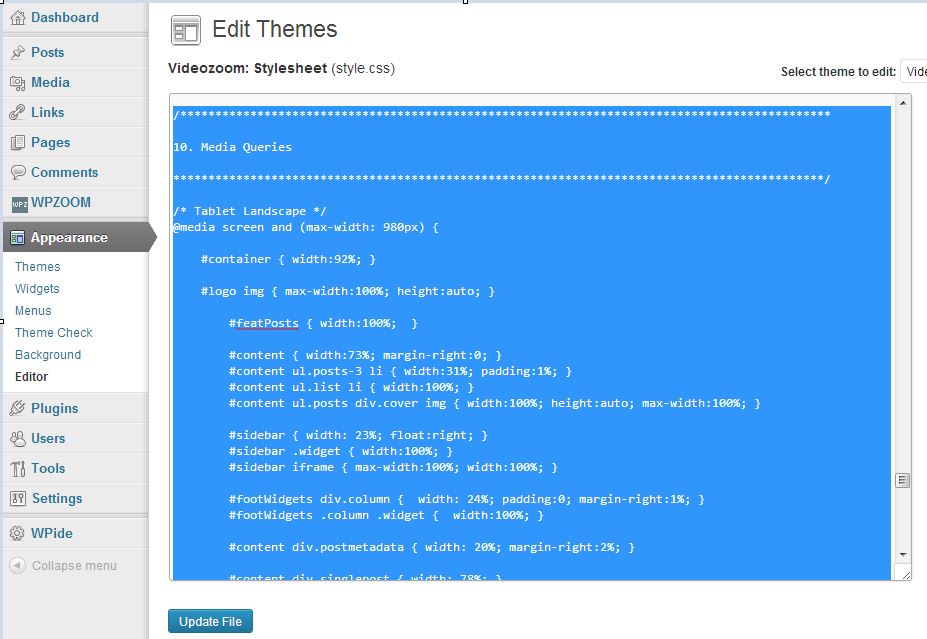
With the selection deleted, you just need to click Update File and your site will no longer have any responsive functionality.

Quantum Responses (0)